FreeComing soon

The VJ software you play on the keyboard

Put your loops and effects on the keys of your Mac or a MIDI keyboard, and play your show as you type. Loops is free and complete: you only pay for the library loops, if you want them, by subscription or with credits.

Try the bank subscription free for 7 days · Coming soon

Download Loops · Free · Coming soonSee examples

On the Mac App Store and on our website · By Starloops, VJs since 2007

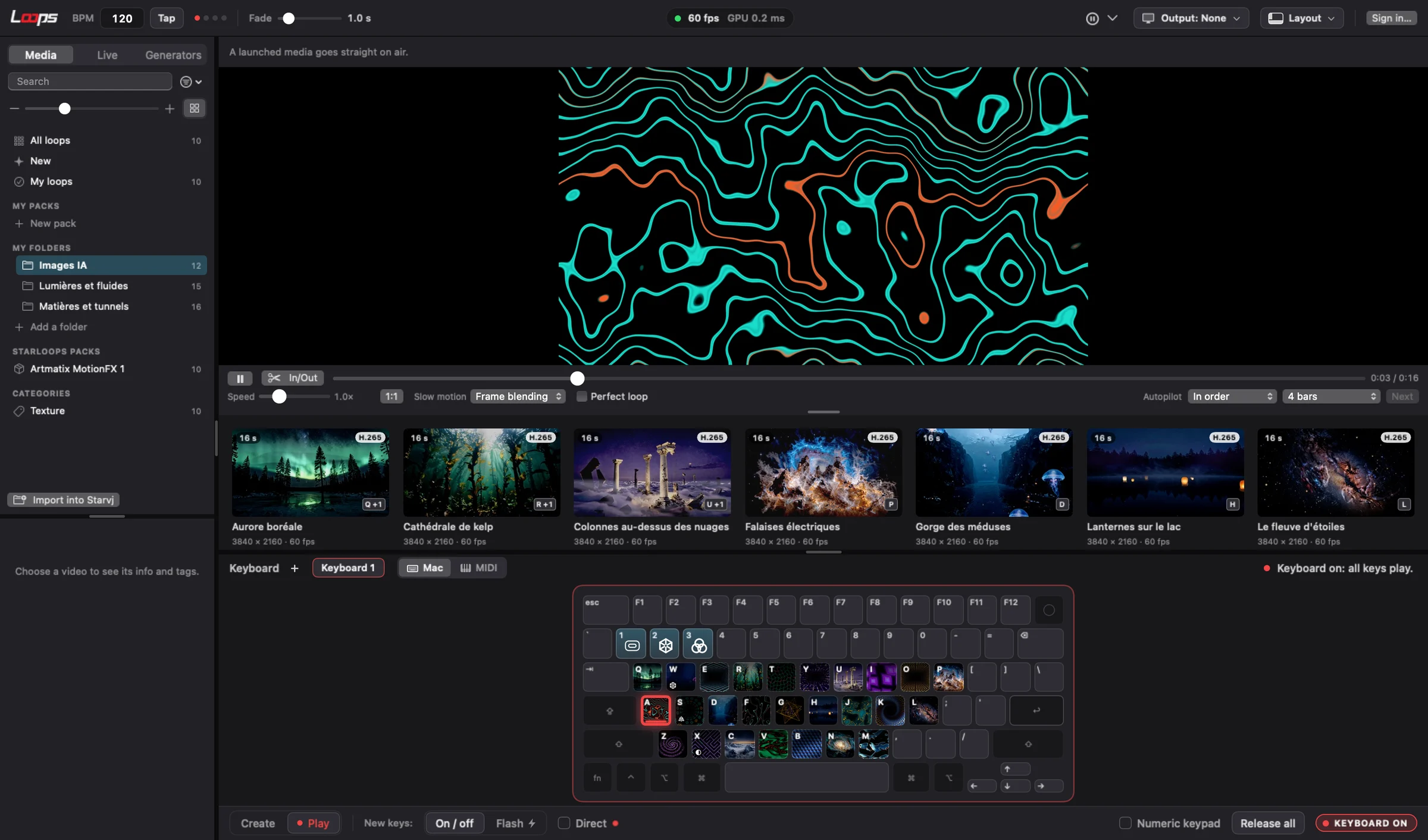
Loops in Play mode: a loop on screen, the grid of your loops and the Mac keyboard filled with loops and effects

The Mac keyboard and the MIDI keyboard

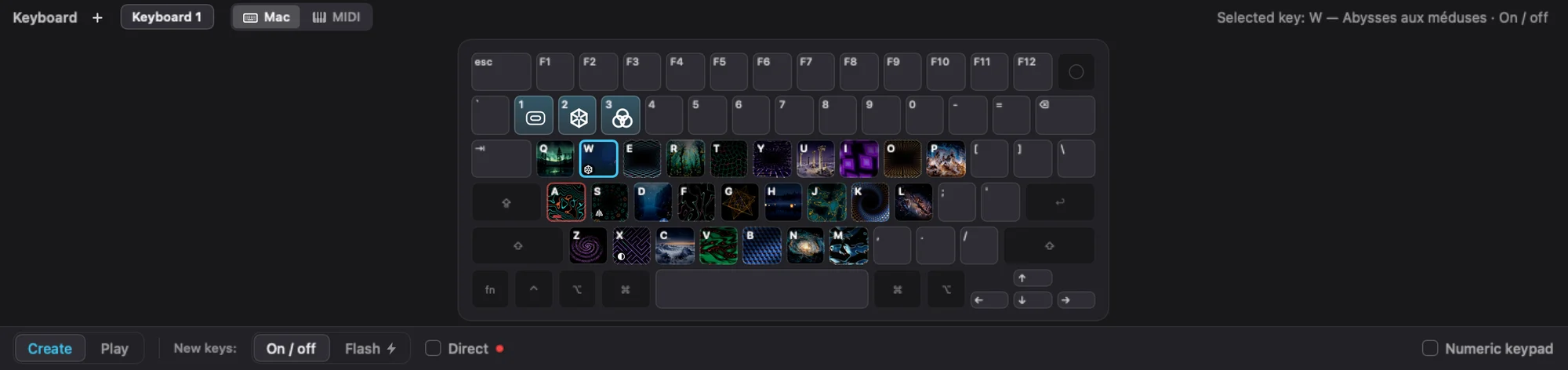
Each key holds a loop, an effect, or a loop with its effects. It plays as On / off or as Flash, while you hold it, with its own fade. Up to 32 keyboards for your tracks and moods. A MIDI keyboard of 2 to 4 octaves plays the same keys, and velocity sets the opacity.

30 effects, in 6 families

Colour, style, light, distortion, time and tunnels: kaleidoscope, LED wall, lasers, CRT screen, tempo stutter, wormhole… Drag an effect onto a loop or a key, up to 6 per key, set to the tempo.

Your media and the Loops library

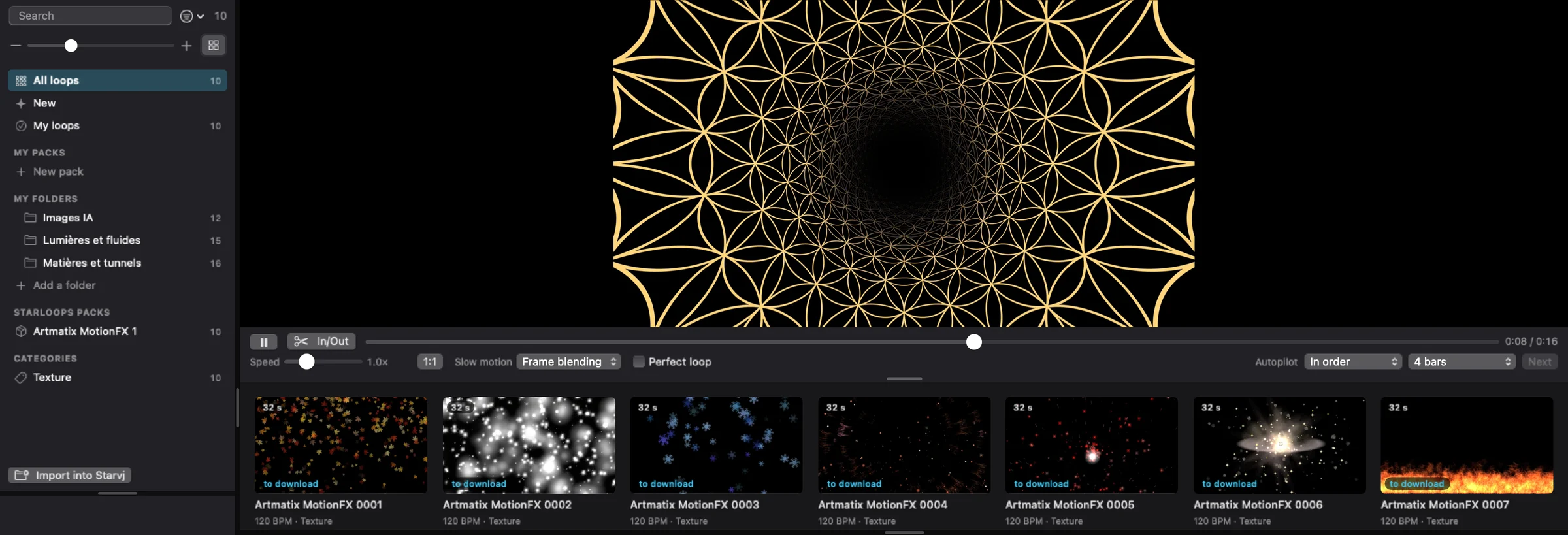
The whole Starloops loop library as HD streaming, free with the “OO” watermark, without it with the subscription, and to download in 4K. Next to it, your own video folders, in H.264, H.265, ProRes or HAP. Loops converts to ProRes or HAP for live use. Themed packs for a whole set: abstract, space, nature, retro, techno, mapping, AI, LED.

Real layering

Each key you strike lands on the picture: in the order you strike them, always in front or always behind. 8 blend modes, opacity, size and rotation per key, and luma or colour keying. HAP Alpha and ProRes 4444 loops keep their transparency.

Live cameras and generators

The Live tab takes anything the Mac sees as a camera: the Mac’s camera, an iPhone, a USB camera, an HDMI box, a Blackmagic or AJA card through its driver’s camera extension. And 26 generators, from plasma to northern lights, play like loops.

One output, up to 4K

The output opens full screen on the screen or projector of your choice, at its resolution, up to 4K, at 50 or 60 Hz. Tap the tempo, let the autopilot move to the next loop every 1 to 16 bars, and slow down with frame blending or the Mac’s AI.

Need more? is built into Starvj

Loops is free and played from the keyboard. Loops is built into Starvj: the library, streaming, My folders and the keyboards, in a Starvj page. Starvj also adds everything big shows need: several screens, mapping, Direct live, controllers, AI.

Discover Starvj

81 features compared, as planned when Starvj goes on sale.

FeatureLoopsLoopsFreeStarvjStarvj
Price and licence6
Price and licence
FeatureLoopsStarvj
PriceThe app itself.Free€199 (1 Mac), €299 (2 Macs) incl. VAT
MacsHow many Macs at once.2 per account1 to 5, €100 incl. VAT per added Mac
Loops page: library, streaming, My foldersLibrary loops are not included; sales not open yet.IncludedIncluded
Free loop creditsWith a purchased licence.Not included100 (200 founders offer)
Offline during the showNo check in the middle of a show.IncludedIncluded
Automatic updatesNever during a show.IncludedIncluded
Playing and keyboards14
Playing and keyboards
FeatureLoopsStarvj
Mac keyboard played as you typeLoops on the keys, Create and Play modes.IncludedIncluded
On / off or Flash, fade per keyA key stays on or plays while held.IncludedIncluded
Up to 32 keyboardsSwitching keyboards cuts nothing.IncludedIncluded
MIDI keyboard played like the keys2 to 4 octaves, velocity sets opacity.IncludedIncluded
Visual instrumentMIDI keys and pads play visuals, effects or columns; 8 voices.Not includedIncluded
Key sequences1 to 8 bars, played or drawn, looping.Not includedIncluded
Column board, preview and TAKEPrepare in preview, send to the master.Not includedIncluded
Launch locked to the tempoOn the beat, on the bar, every 2 or 4 bars.Not includedIncluded
Several boards per projectWith layers shared by all boards.Not includedIncluded
Clicker modeA presentation remote sends the next column.Not includedIncluded
Blackout, freeze, silent modeEdit the show without the audience seeing it.Not includedIncluded
Customisable shortcutsConflicts detected.Not includedIncluded
Tapped or typed tempoIncludedIncluded
AutopilotMoves to the next media every 1 to 16 bars.IncludedIncluded
Media9
Media
FeatureLoopsStarvj
Your video foldersTags and filters by codec, size, frame rate, transparency.IncludedIncluded
H.264, H.265, ProRes, HAP, HAP AlphaIncludedIncluded
Still imagesNot includedIncluded
Conversion to ProRes or HAPPaused during the show.IncludedIncluded
Library shared by all projectsAutomatic tags, computed on the Mac.Not includedIncluded
In / Out pointsIncludedIncluded
Perfect loopThe end melts into the start.CrossfadeCrossfade, luma or morph
GeneratorsPlasma, fire, water, aurora, lasers…2626
Video sound and audio mixerVolume, mute and solo per layer.Not includedIncluded
Effects and layers13
Effects and layers
FeatureLoopsStarvj
EffectsTwo separate catalogues.30, in 6 families112, in 11 families
Ready-to-play looksNot included433
Effects on the keysUp to 6 per key.IncludedNot included
User effect presetsNot includedIncluded
LayersKeys layered over the backgroundUnlimited layers
8 blend modes, luma and chroma keyIncludedIncluded
4-corner perspective, framesNot includedIncluded
4 masks per layerShapes and free path.Not includedIncluded
Copies, mirror, kaleidoscope, layer 3DNot includedIncluded
Colours and levelsWith histogram.Not includedIncluded
Automatic motionTo the tempo, the sound or body tracking.Not includedIncluded
Column transitions and morphingPosition, scale and colour glide from column to column.Not includedIncluded
Sound-reactiveLows, mids, highs, hits.Not includedIncluded
AI on the Mac, no cloud7
AI on the Mac, no cloud
FeatureLoopsStarvj
Slow motion by frame blending or live AIIncludedIncluded
Prepared slow motion ×2, ×4, ×8; speed-upNot includedIncluded
AI upscaling to 4K, denoisingNot includedIncluded
Person cut-out without green screenNot includedIncluded
Body trackingHands, head and arms drive motion.Not includedIncluded
Live captions from the microphoneFrench or English.Not includedIncluded
Natural-language commandsApple Intelligence, macOS 26.Not includedIncluded
Inputs4
Inputs
FeatureLoopsStarvj
Cameras and capture devicesMac camera, iPhone, USB, HDMI, Blackmagic or AJA cards.IncludedIncluded
NDI inputNot includedIncluded
Syphon inputNot includedIncluded
Audio inputFor sound reactivity.Not includedIncluded
Outputs, Direct live and mapping12
Outputs, Direct live and mapping
FeatureLoopsStarvj
Outputs1 screen, up to 4KSeveral screens
Direct liveCamera, NDI or Syphon laid down per pixel, at the last moment, on each output.Not includedIncluded
NDI and Syphon outputNot includedIncluded
Large canvasUp to 16,384 px per side, 32,768 on M5 chips.Not includedIncluded
Multi-canvasAuxiliary canvases for other screens.Not includedIncluded
Slices and screensA canvas area placed in an output.Not includedIncluded
Warping4 corners, grid, free points, to the pixel.Not includedIncluded
Edge blending between projectorsNot includedIncluded
Output masks, test patternNot includedIncluded
Colour correction per outputNot includedIncluded
Screen refresh rates aligned50 or 60 Hz.Not includedIncluded
Timeline video renderProRes, H.265, H.264.Not includedIncluded
Control and sync8
Control and sync
FeatureLoopsStarvj
MIDI notesIncludedIncluded
MIDI and keyboard learningFade and speedEverything
Controllers with LED and fader feedbackBCF2000, Akai MPK Mini IV, Arturia MiniLab 37.Not includedIncluded
Master effects pedal8 strips and banks.Not includedIncluded
Control surface workshopButtons, sliders, joysticks, screens.Not includedIncluded
DMX pixel mappingArt-Net or sACN, output.Not includedIncluded
LTC and MTC timecode outputNot includedIncluded
Local web serverTimecode, preview, Pause / Go to, with access code.Not includedIncluded
Composition and windows8
Composition and windows
FeatureLoopsStarvj
Timeline with keyframesAn edit placed in a cell.Not includedIncluded
MultiviewUp to 16 views with timecode and meter.Not includedIncluded
Timecode windowLarge master countdown.Not includedIncluded
Workspaces (⌃1 to ⌃9)Project, canvas, Loops, FX, timeline, audio, controllers, outputs, DMX.Not includedIncluded
Separate Keyboard windowIncludedNot included
Adaptive resolution, heat monitoringNot includedIncluded
Autosave, export with mediaNot includedIncluded
Session log and support from the appIncludedIncluded
  1. 1

    Subscription or credits

    Two planned subscriptions, HD and Premium 4K, or credit packs. Both will be available in “My account” or in the app.

  2. 2

    Discover it

    Without a subscription, the whole library can be discovered as HD streaming with the Starloops “OO” watermark, to choose and prepare your show.

  3. 3

    Get the loop

    1 credit = 1 loop kept for life, with all its versions: 4K and 1080p, at 60 frames per second. A pack costs 1 credit per loop you do not have yet.

  4. 4

    Play it

    It lands in Starvj or in the Loops app, and is converted on your Mac to ProRes or HAP for live use. Download it again as often as you need.

A few loops made for the library

Loops made by our studio for the stage: AI imagery, textures, light, geometry. The whole library is waiting in Loops.

Discover the whole library in Loops, for free

Download Loops · free · Coming soon

Subscription or credits

The Loops app is free and nothing in it is locked: you only pay for the loops of the library.

Planned prices · Coming soon

Subscription

Two plans are planned, monthly or yearly: HD and Premium 4K, with a 7-day free trial. Professional use included.

  • HD

    €9.99 incl. VAT / month

    or €99.99 incl. VAT / year

  • Premium 4K

    €15.99 incl. VAT / month

    or €159.99 incl. VAT / year

Credit packs

1 credit = 1 loop kept for good, in all its resolutions. Credits never expire.

  • 20 credits

    €10 incl. VAT

  • 60 credits

    €25 incl. VAT

  • 200 credits

    €50 incl. VAT

  • 500 credits

    €100 incl. VAT

Planned prices, VAT included. Upcoming offer: the library is not on sale yet, and the Loops terms and terms of sale will be updated before it opens.

For your shows, videos and ads

You may use the loops for all your purposes, personal and professional, paid or not: concerts, clubs, festivals, theatre, events, mapping, LED screens, and also recordings, streams, music videos, advertising and online videos. You may edit, crop, colour and transform them, even in monetised works. Two things are forbidden: reselling or redistributing the loops as media, and training an artificial intelligence with them.

Read the Loops terms

Delivered formats

H.265 4K and 1080p
Every loop is delivered in 10-bit H.265, at 3840 × 2160 and 1920 × 1080: about 100 MB for 16 seconds in 4K.
60 fps, for smooth slow motion
Every loop is rendered at 60 frames per second: the most frames, so slow motion stays smooth. Starvj and the Loops app blend frames for every frame rate, and an option plays the loop at 50 frames per second, frame by frame, for 50 Hz outputs (Europe, broadcast).
ProRes or HAP
Playable straight away, then converted on your Mac for live use: ProRes for quality, HAP to stack many layers or for software that prefers it.
Transparency
Loops meant to be layered (particles, outlines, neon) keep their transparency: HEVC with alpha in a QuickTime file, converted on your Mac to ProRes 4444 or HAP Alpha. Marked on each loop concerned.
Watermarked version
Without a subscription, the preview or the app’s HD streaming, with the “OO” watermark: to choose, prepare the show, and even play in public, with its watermark.